
Most brokers bolt options onto a stock app. tastytrade did the opposite: it built a stock-and-futures broker around the way professional options-sellers actually think — probabilities, defined risk, buying power, and rolling. If you have ever felt like your broker was fighting you every time you tried to sell a spread, this is the platform that stops fighting. This guide walks you from an empty account to a live, managed premium-selling position, and then keeps going — into the regimes where the tools behave differently, the confluence stack that turns a good ticket into a good trade, the mistakes that quietly drain small accounts, and the way seasoned sellers use the exact same buttons to reach the opposite conclusion a beginner does.
One honest caveat up front, and it applies to the whole piece: brokerage interfaces change constantly. Menu names move, buttons get renamed, approval screens get reworked, fee schedules get repriced. Everywhere I describe a specific click-path or a specific number, treat it as "this is where it lives and what it's called as of this writing — verify the current screen when you sit down." The workflow and the logic are stable and worth memorizing. The pixels and the pennies are not.
What tastytrade Is & Who It's Best For
tastytrade is a self-directed retail brokerage relaunched under that name in 2017 by the same crew (Tom Sosnoff and team) who built thinkorswim and then sold it to TD Ameritrade. That lineage matters more than any feature list. These are options-market-maker brains who spent years watching retail traders use tools designed for buy-and-hold investors and then lose money in ways the tools practically encouraged. So they built the tool they wished retail had — one that assumes you are running a book, not buying a stock and hoping.
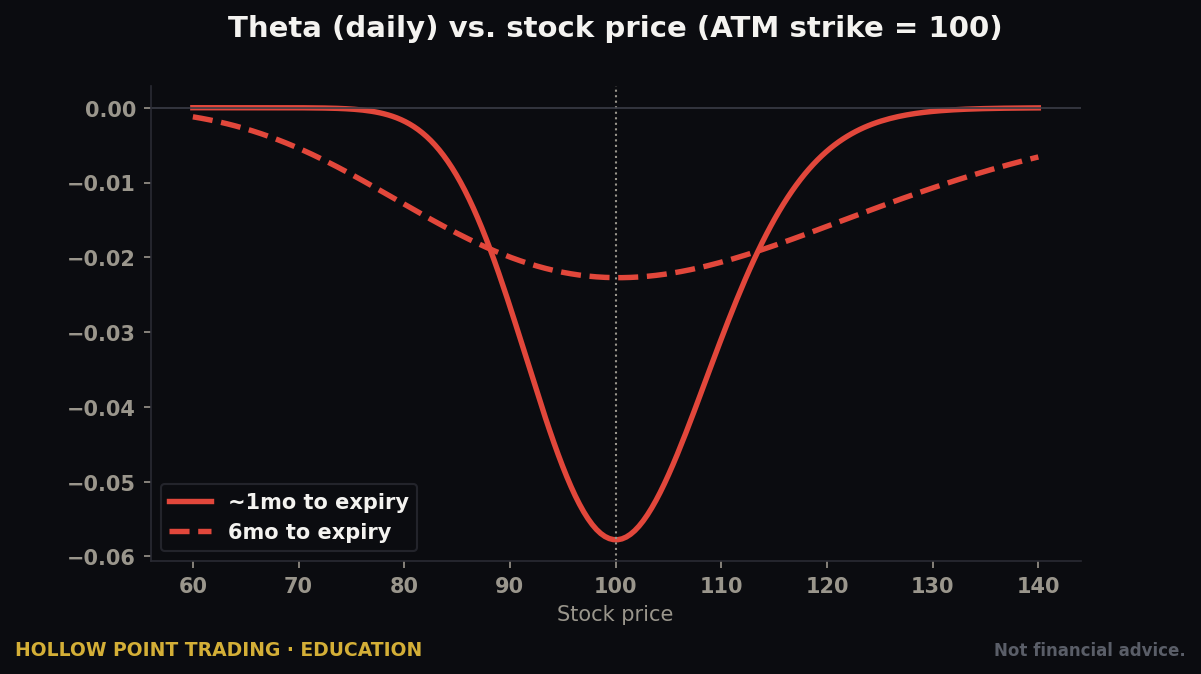
The whole platform is organized around a specific worldview HPT shares: you don't predict, you position. Options-sellers make money by collecting premium and letting probability and time decay (theta) work in their favor, then managing the trade mechanically rather than praying for a direction. tastytrade's interface assumes you are doing exactly that. It puts probability of profit, buying power reduction, and your P/L curve front-and-center on the order ticket — numbers most brokers bury three menus deep, if they surface them at all.
The premium-seller worldview in one paragraph
Here is the thesis the entire cockpit is built to serve. Implied volatility — the premium baked into option prices — tends to be priced higher than the volatility that actually shows up (this is the "variance risk premium," and it's one of the most persistent edges in markets). Sellers harvest that overpricing. You collect a credit, you define your risk, and then three forces work for you: time decay grinds the option's value down every day, volatility contraction deflates the premium when fear fades, and probability was on your side the moment you chose an out-of-the-money strike. You will still lose individual trades — often. The edge lives in the aggregate across many trades managed the same disciplined way. tastytrade's screens exist to keep those four levers — probability, decay, volatility, and defined risk — in front of your face at all times.
Who it's genuinely best for
Best for: active options traders, premium-sellers, spread traders, and futures/options-on-futures traders who want low, capped commissions and a fast, keyboard-driven ticket. It's also genuinely strong for small accounts now that the day-trading landscape changed in 2026 (covered in full below). If your day involves selling verticals, iron condors, strangles, and cash-secured puts, and rolling them, nothing in retail is smoother.
Not ideal for: pure buy-and-hold index investors (it's fine, but overkill — you don't need this), people who want fractional shares of hundreds of names for dollar-cost-averaging, or anyone who wants a hand-held robo-advisor. There are no mutual funds, and the research library is thin compared to a Fidelity or Schwab. tastytrade gives you mechanics and education, not stock-picking research. You bring the thesis; they hand you the cockpit.
The trade-off in one line: you give up broad research and fractional-everything; you get the best premium-selling ergonomics in retail.
Opening & Funding an Account (Step by Step)
Account opening is fully online and typically takes 10–15 minutes, with approval often same-day.
Step 1 — Start the application. Go to tastytrade.com and choose "Open an account." You'll pick an account type first (covered in the account-types section below). For most individuals starting out, that's an Individual account.
Step 2 — Identity and personal info. Name, address, Social Security number (for US accounts), employment, date of birth. Standard KYC ("know your customer") regulatory collection every broker must do. Nothing here is optional or negotiable.
Step 3 — The financial and experience questionnaire. This is the step beginners rush and shouldn't. You'll report annual income, net worth, and liquid net worth, plus your trading experience and objectives. tastytrade uses these answers to decide your options trading level and margin eligibility. Answer honestly — but understand the mechanics of what you're doing: if you claim zero experience and a tiny net worth, you may get approved only for the most basic strategies, which locks you out of the defined-risk spreads that are the whole point of the platform. Conversely, don't inflate numbers to unlock naked-options approval you have no business using. The suitability screen is a gate, not a dare.
Step 4 — Choose cash or margin. You'll elect a cash account or a margin account here. Margin unlocks spreads and better buying power but requires you to maintain $2,000 or more in account equity to use margin privileges. There's no minimum just to open — you can open with $0 and fund later.
Step 5 — Fund it. The minimum deposit to open is $0. Funding options:
- ACH bank transfer — free, no minimum, and you typically get immediate buying power up to $10,000 while the cash settles. This is how almost everyone funds.
- Wire transfer — faster for large amounts and posts fully same-day; your bank may charge a fee on its end.
- Account transfer (ACATS) — move positions in from another broker without liquidating. Takes several business days; the sending broker may charge a transfer-out fee that tastytrade sometimes reimburses above a threshold — verify.
- Check — slowest, rarely worth it.
There are no deposit or withdrawal fees on ACH, and no account maintenance or inactivity fees. Practically: link your bank via ACH, deposit what you're comfortable losing while learning, and you're live within a day.
Step 6 — Wait for approval, then set your platform. Once approved you'll get login credentials. Download the desktop platform, or just log into the web platform, and confirm your options level shows what you expected. If it came back lower than you wanted, note it — you can request an upgrade after you have some activity on the account.
A worked funding example
Say you deposit $5,000 via ACH on a Monday. You'll typically see up to that amount available as buying power almost immediately (the "instant BP" feature fronts you against the pending settlement, up to the $10K cap). The cash itself settles in a few business days. What this means in practice: you can place your first defined-risk trade Monday afternoon, but don't try to withdraw funds you haven't truly settled, and don't stack trades assuming the instant BP is infinite — it's capped, and it's a courtesy, not a margin line.
The Interface: Web, Desktop & Mobile
tastytrade ships three surfaces. They share a design language but differ sharply in horsepower, and choosing the right one for the task is a real skill.
The desktop platform (the flagship)
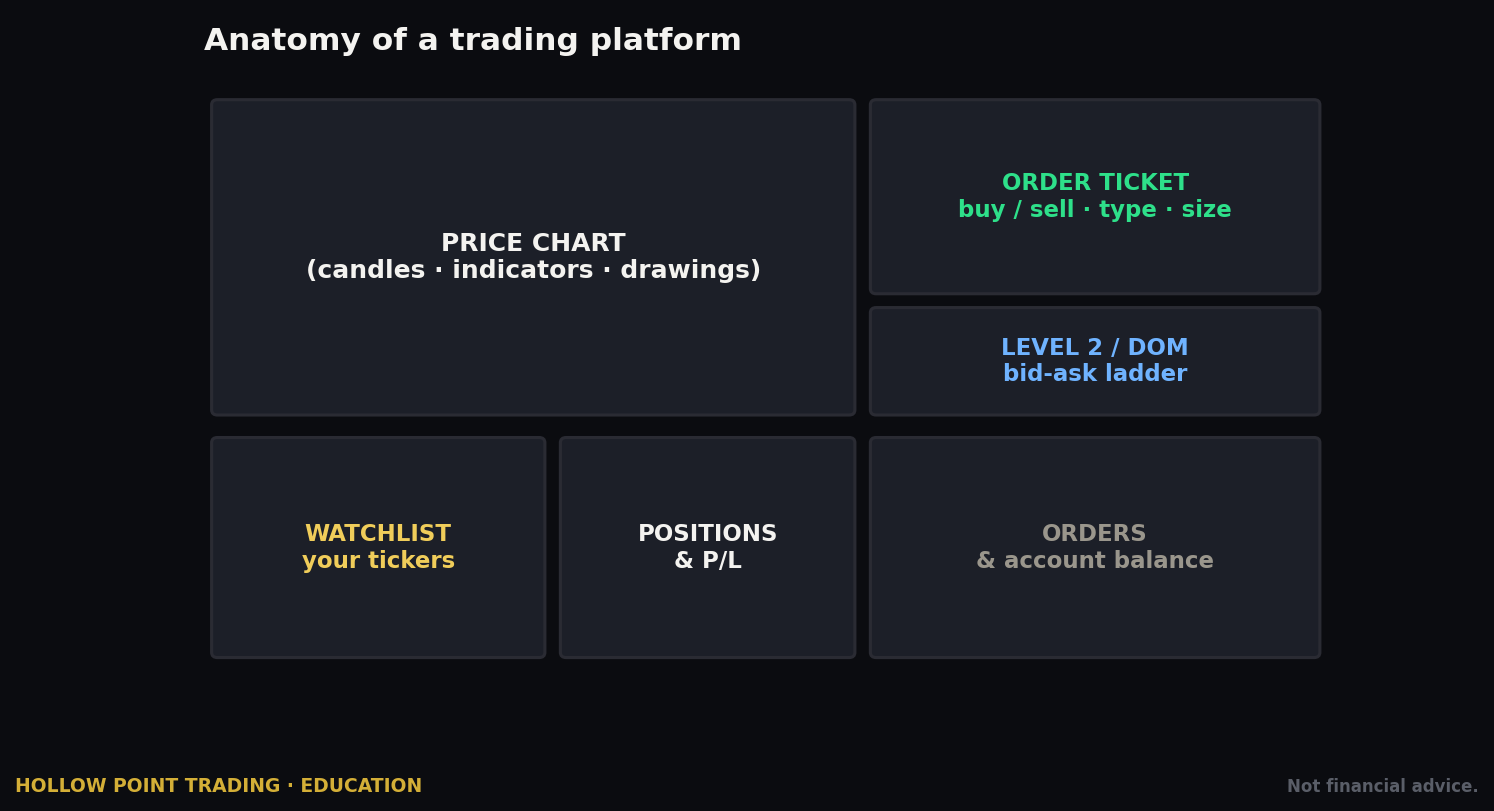
This is a downloadable application for Mac and Windows and it's where serious users live. It's built around a tabbed workspace. The tabs you'll use constantly:
- Trade tab — your command center. Type a symbol and you see the quote, the options chain, and a "Table" and "Curve" view of every strike. You build and fire orders from here.
- Analysis tab — the risk lab. Model a position's P/L, run probabilities, and simulate what happens if volatility or price moves before you commit real money.
- Chart / tastycharts — charting with studies and indicators, good enough for setup work though not the reason anyone chooses the platform.
- Positions / Portfolio — your live holdings with real-time P/L and, crucially, buying power front and center.
- Watchlists, Activity, Follow (the live financial-news show).
The desktop version's superpower is speed and density: right-click almost anything to act on it, hotkey your way through order entry, and the layout is tuned for someone managing a dozen short-premium positions at once. The default grid can feel like an airliner cockpit the first time you open it — that reaction is normal, and it's a reason to start elsewhere.
The web platform
Runs in your browser, no download. It covers the vast majority of what most traders need — full options chain, order ticket, a "Quick Analysis" tab, charts, and portfolio. It's lighter than desktop and a great place to learn because it's less cluttered: fewer panels means fewer ways to fat-finger something while your hands are still learning the rhythm. Feature parity with desktop is close but not total; the deepest analysis modeling and the fastest right-click management live on desktop.
The mobile app (iOS/Android)
Genuinely capable — you can open, roll, and close multi-leg options positions from your phone, check buying power, and manage risk on the go. It is not where you'd want to build a complex four-leg structure for the first time, but for managing existing positions it's excellent. The single most common good use: you're away from your desk, a short put spread hits your 50% profit target, and you close it in fifteen seconds from your phone rather than letting a winner round-trip.
The HPT read on this: learn on web, live on desktop, manage on mobile. Don't try to do first-time complex construction on a phone screen, and don't treat the dense desktop app as a tutorial — it assumes you already know what a vertical is.
Placing Your FIRST Stock Trade, Step by Step
Before you touch a single option, do one plain-vanilla stock trade to learn the ticket mechanics with the lowest possible complexity. Stock and ETF trades are commission-free, so this costs you nothing but the share price.
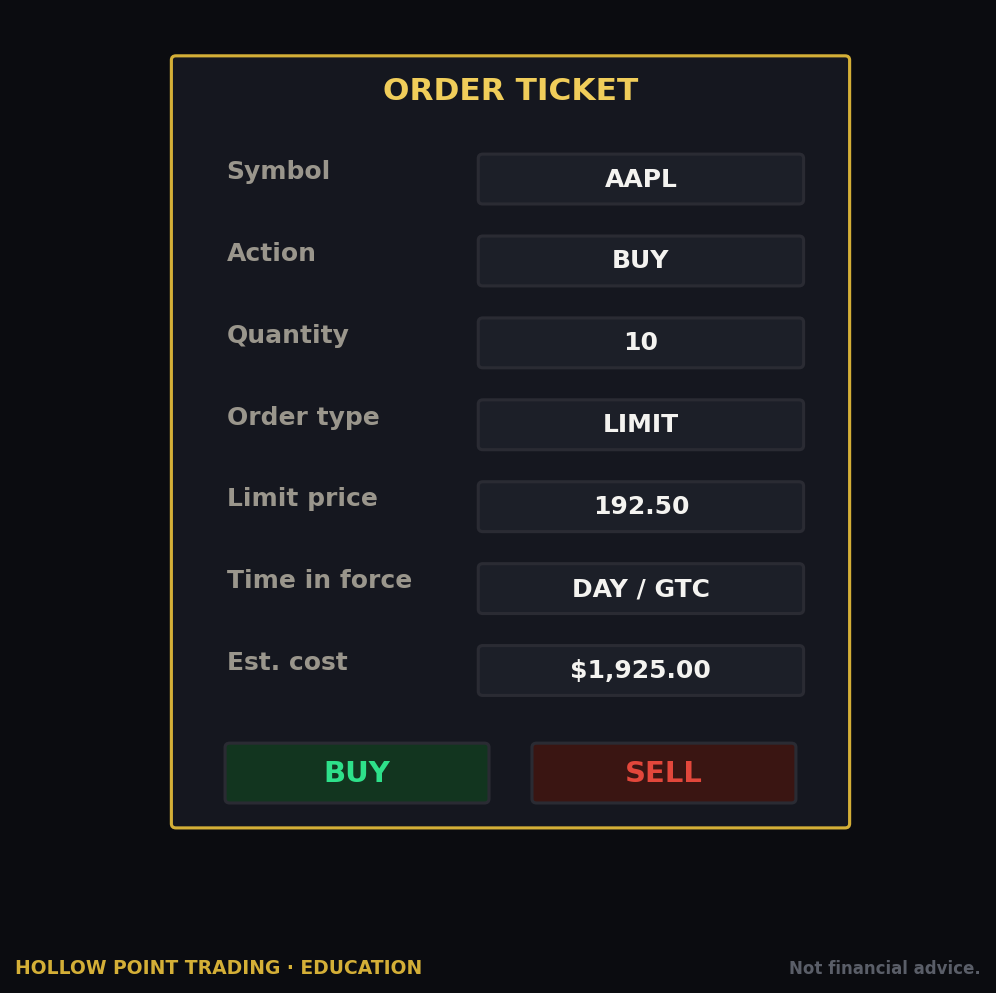
- Open the Trade tab and type a ticker (say, a liquid ETF like SPY or a stock you actually want a share of). Press enter.
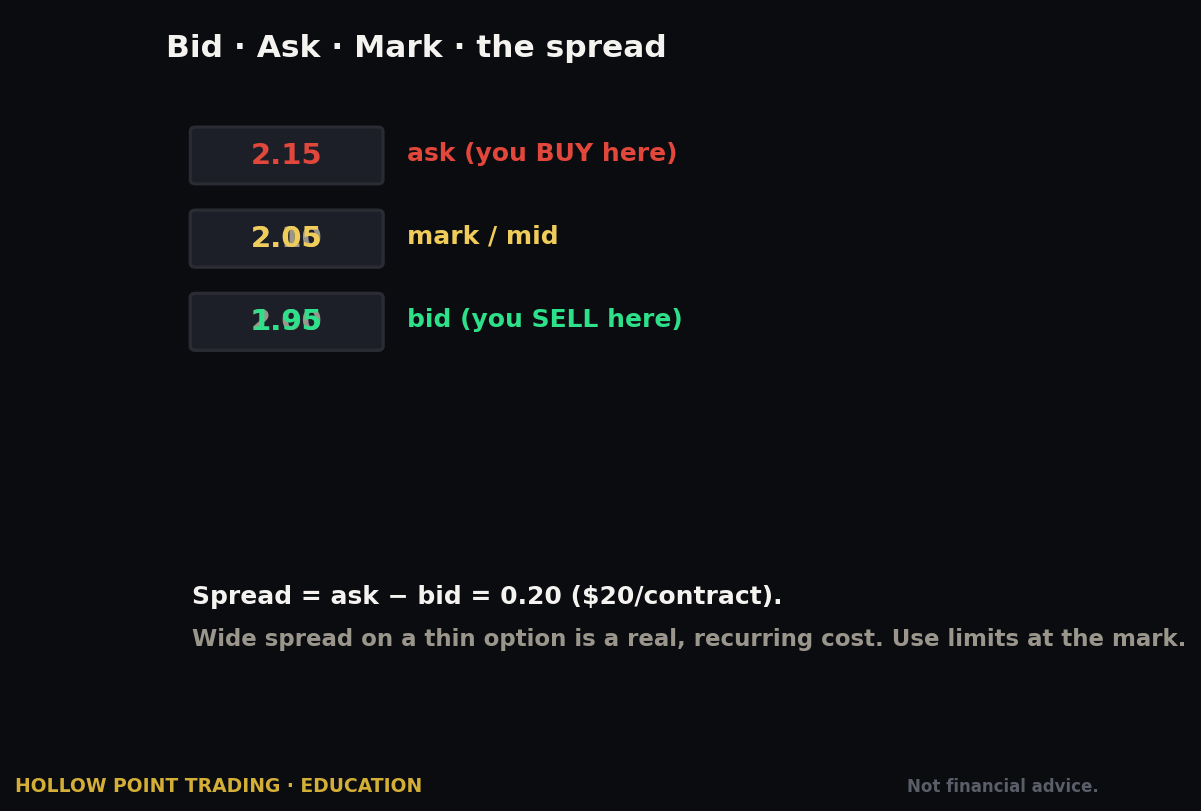
- You'll see the quote — bid, ask, last, and the day's range. The bid is what buyers will pay; the ask is what sellers want; the difference is the spread. For liquid names it's pennies; that penny gap is your first, cheapest lesson in why liquidity matters.
- Click the ask price (to buy) or the bid (to sell). This starts an order ticket pre-filled as a limit order at that price.
- Set quantity — number of shares.
- Choose order type — for your first trade, a Limit order at or near the ask is the safe, controlled choice. It says "fill me at this price or better, never worse." (Order types in full below.)
- Set time-in-force — Day means it expires at the close if unfilled; GTC ("good til canceled") keeps working across sessions.
- Review the ticket. It shows your estimated cost and the buying-power effect.
- Send — then confirm. On desktop there's a confirmation step; get in the habit of actually reading it, because that habit is the thing that saves you on a fast four-leg options ticket later.
- Check the Positions tab — your share position now shows there with live P/L.
That's the whole muscle memory. Every options order uses this same click-the-price-then-review-then-send rhythm — just with more legs and more numbers on the ticket. Doing it once on a single share of something cheap turns the options ticket from intimidating to familiar.
Getting Options Approval + Reading the Chain
The three permission tiers
tastytrade groups options permissions into three levels. Names and exact allowances can be updated, so verify yours in the account settings, but as of this writing they are:
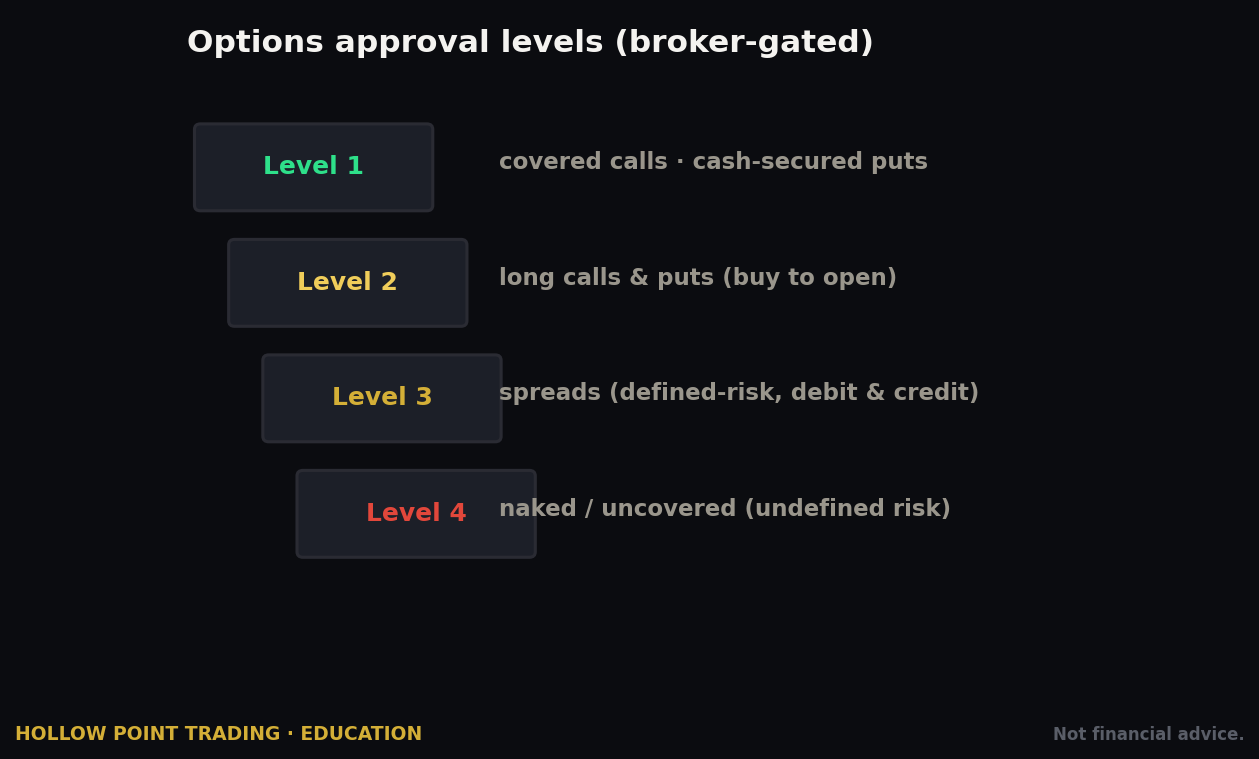
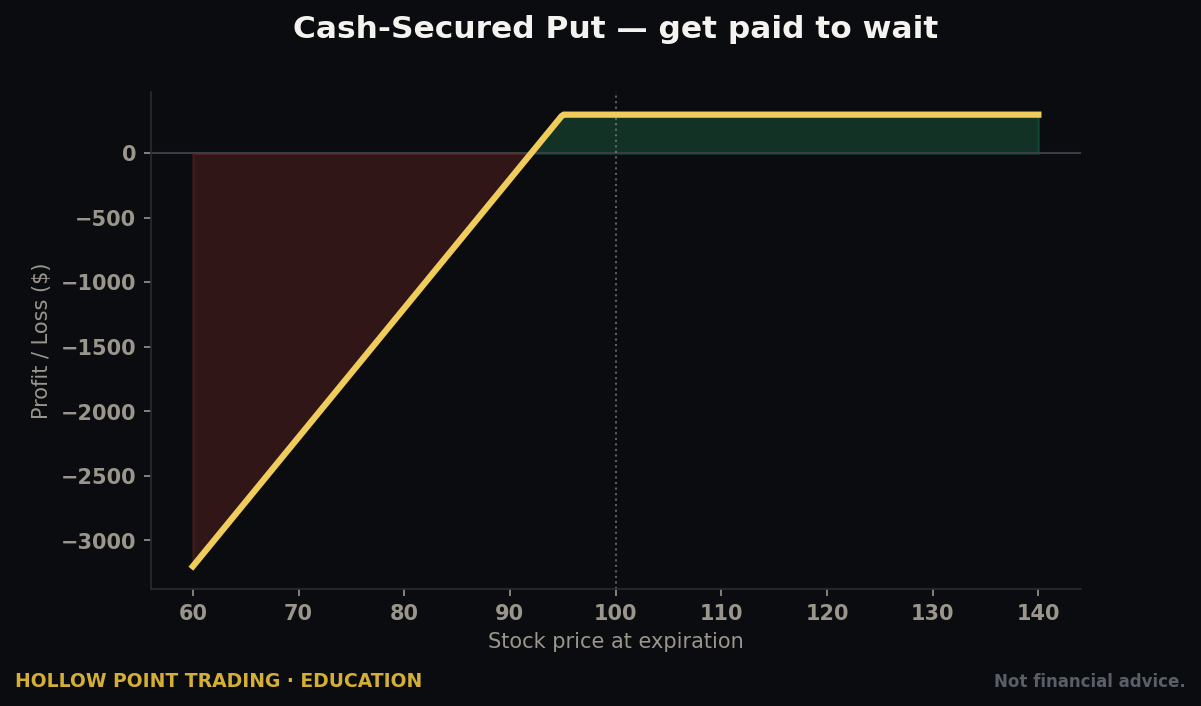
- Limited (Level 1) — buy calls and puts, sell covered calls, sell cash-secured puts. No spreads, no naked options, no futures. This is the "you can't blow up" tier.
- Basic (Level 2) — everything in Limited plus defined-risk spreads (verticals, iron condors, iron flies, butterflies, calendars) and selling uncovered/naked puts. No naked calls, no futures. This is the premium-seller's home base — defined-risk spreads are the bread and butter here.
- The Works (Level 3) — the full menu: uncovered (naked) calls, futures, and options on futures. Also the gateway to portfolio margin for qualified, funded accounts.
How to get approved / upgrade. During application you elect a level; tastytrade approves based on your stated income, net worth, and experience. To upgrade later, go into your account management settings and request a higher tier — it re-runs the suitability check. For most HPT-style traders, Basic (Level 2) is the target: it unlocks defined-risk spreads without requiring the financials that naked-call approval demands. There is no shame in sitting at Basic for a year. Most professional retail sellers make the bulk of their money inside what Level 2 already allows.
Reading the chain here
Pull up a symbol on the Trade tab and you get the options chain in two views:
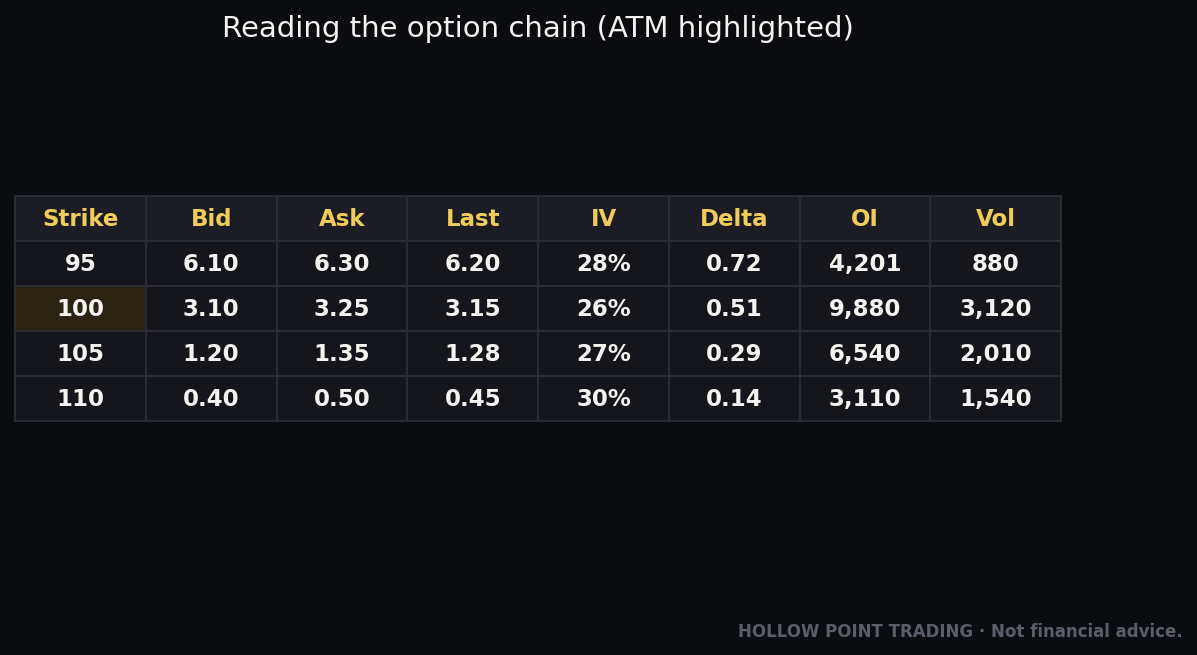
- Table view — the classic grid. Expirations run down the left; pick one to expand its strikes. For each strike you see bid/ask for calls and puts, and — this is the tastytrade signature — columns you can add for probability of profit, probability of touch, delta, theta, and implied volatility (IV). Delta doubles as a rough probability the option finishes in-the-money: a 30-delta put has roughly a 30% chance of expiring in-the-money, so selling it gives you roughly a 70% probability of profit at expiration before management. The chain literally tells you the odds.
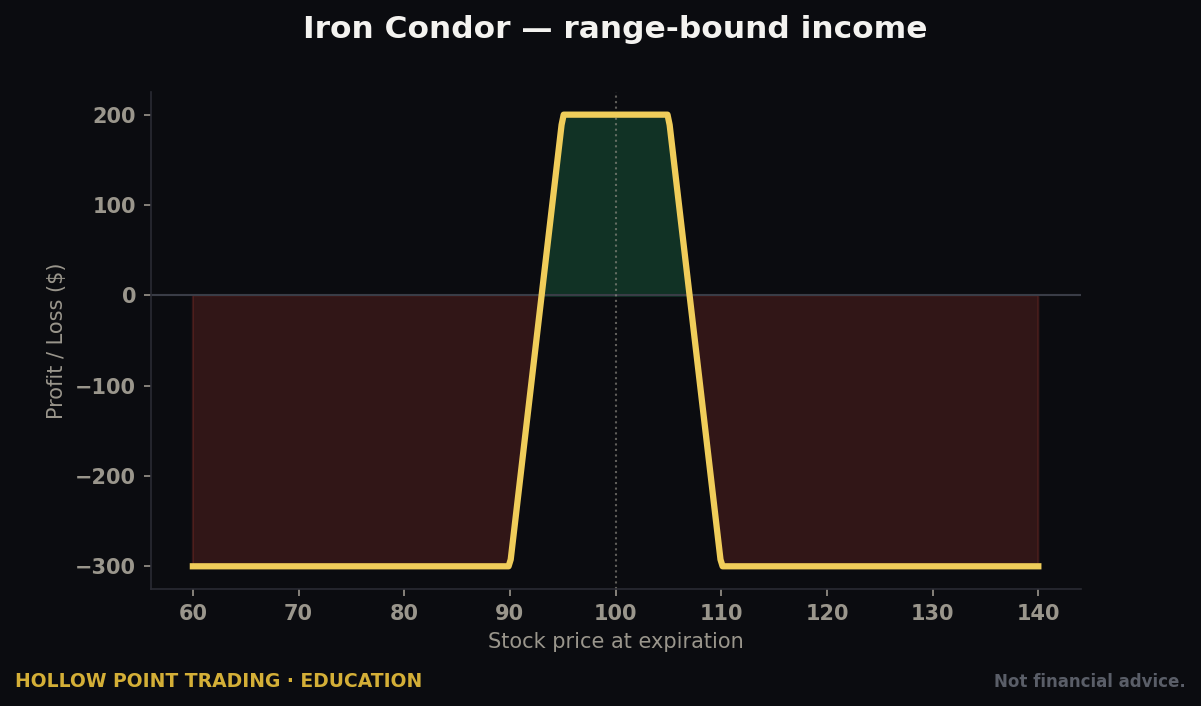
- Curve view — the same expiration drawn as a payoff curve. As you click strikes to build a position, the curve redraws to show your profit/loss at expiration across every price, with break-evens and max-profit/max-loss marked visually. For an iron condor, you see the flat-topped "tent" of profit between your short strikes before you've committed a dollar.
The mental model tastytrade is pushing: you're not picking a strike, you're picking a probability and a defined risk. The chain surfaces exactly those numbers so you stop guessing.
Probability of profit vs. probability of touch — the distinction that trips people up
These two columns look similar and mean very different things. Probability of profit (POP) is the modeled chance the trade is a winner at expiration. Probability of touch (POT) is the chance price merely touches your short strike at any point before expiration — and it's roughly double the probability of finishing there. So a strike with a 30% chance of finishing in-the-money has roughly a 60% chance of being touched along the way. This is why premium-sellers who don't understand POT panic and close good trades: price tags their short strike, they feel the trade is "losing," and they bail — when the math always said a touch was more likely than not. Read both columns. Expect to be touched. Manage on your rules, not on your pulse.
The Order Ticket & Every Order Type
The order ticket is where tastytrade's design philosophy is loudest. Click any bid or ask and the ticket builds. Click a second, third, fourth strike and it assembles a multi-leg spread automatically — no separate "spread builder." The ticket continuously shows you:
- Price / credit or debit — are you collecting premium (credit, the seller's goal) or paying (debit)?
- Buying power reduction (BPR) — how much of your buying power this trade ties up. On tastytrade this is impossible to miss; it's central to the ticket, not an afterthought.
- Max profit / max loss / break-even — for defined-risk trades, stated in dollars.
- Probability of profit — the modeled odds the trade wins.
Order types supported
Verify the live list, but as of this writing:
- Market — fills immediately at the best available price. Fast, but on wide options spreads you can get a poor fill. Use sparingly on options, and effectively never on illiquid ones.
- Limit — fill at your price or better. The default and correct choice for almost all options orders. For spreads you set a net credit or debit limit, and you can walk it toward the mid-price to improve your fill.
- Stop (stop-market) — becomes a market order when a trigger price is hit. Used to cap losses; note it can slip badly in a fast move because it converts to a market order.
- Stop-limit — becomes a limit order at the trigger. More control over price, but risks not filling at all in a fast move — the classic trade-off.
- Stop orders on spreads — tastytrade supports stops on multi-leg option positions, which many brokers don't. Useful, but be careful: a stop on a wide spread can trigger on a single bad print.
- OCO (One-Cancels-Other) — two orders where filling one cancels the other. Used to bracket an existing position with a profit target and a stop simultaneously.
- OTOCO (One-Triggers-a-OCO) — a bracket on a new position: your opening order triggers a paired profit-target-and-stop bracket the moment it fills. This lets you set the whole trade — entry, target, stop — in one send.
Time-in-force (TIF): Day, GTC (good-til-canceled), and GTD (good-til-date) for equities and equity options. Futures orders are Day-only at this writing. Note that brackets aren't available on crypto, futures-options, or event contracts — verify current coverage before you rely on one.
The defined-risk vs. undefined-risk workflow — this is the core skill
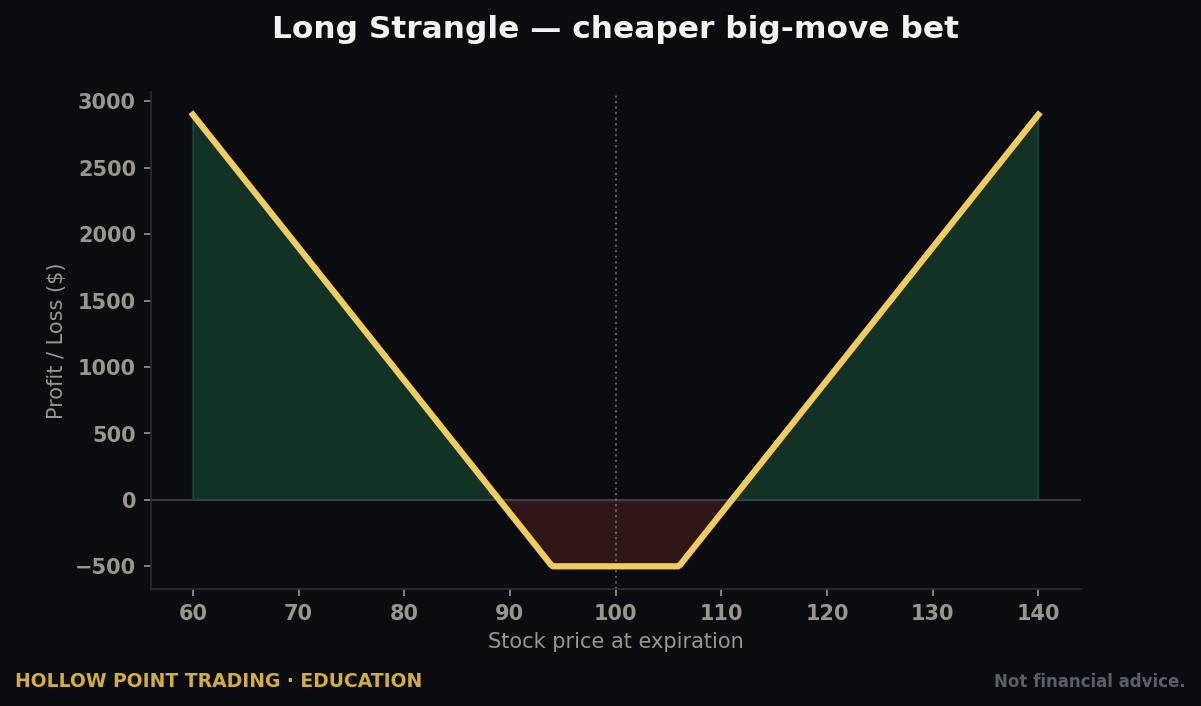
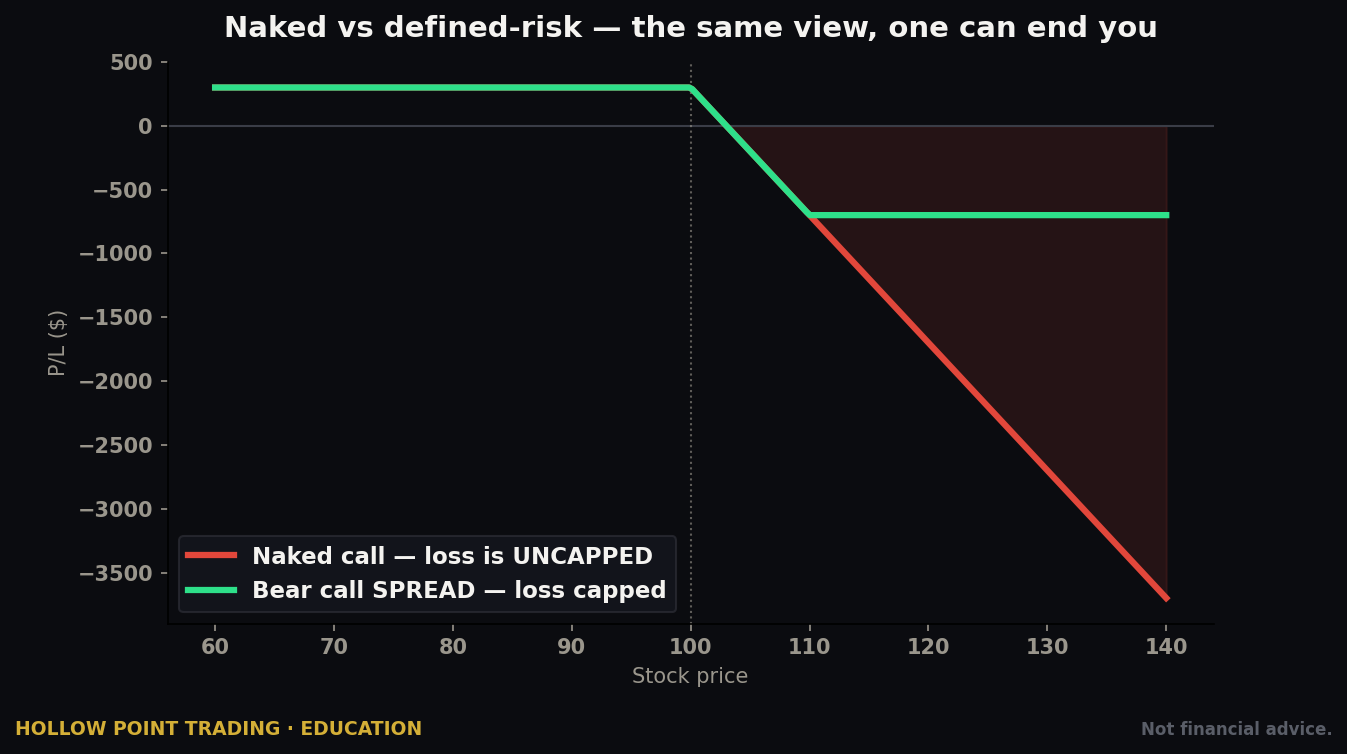
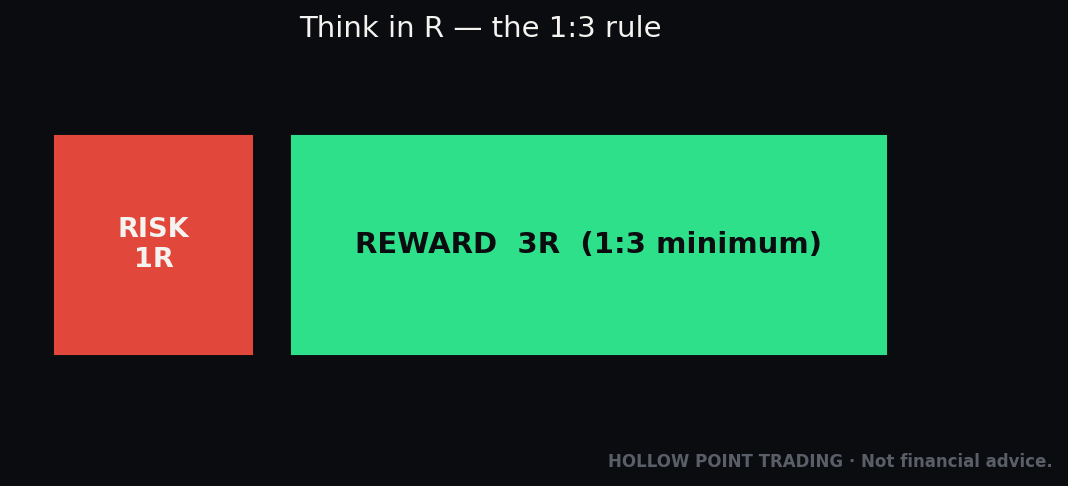
- Defined-risk trades (verticals, iron condors, iron flies, butterflies) have a known, capped maximum loss. The ticket shows it as a dollar figure, and your buying-power reduction equals roughly that max loss. This is where beginners and disciplined traders should live. If you sell a put credit spread for $1.00 with $5-wide strikes, your max profit is $100, your max loss is $400, and you know both before you send. Your BPR is about $400. That is the entire risk. Price can gap to zero overnight and you still can't lose more than $400.
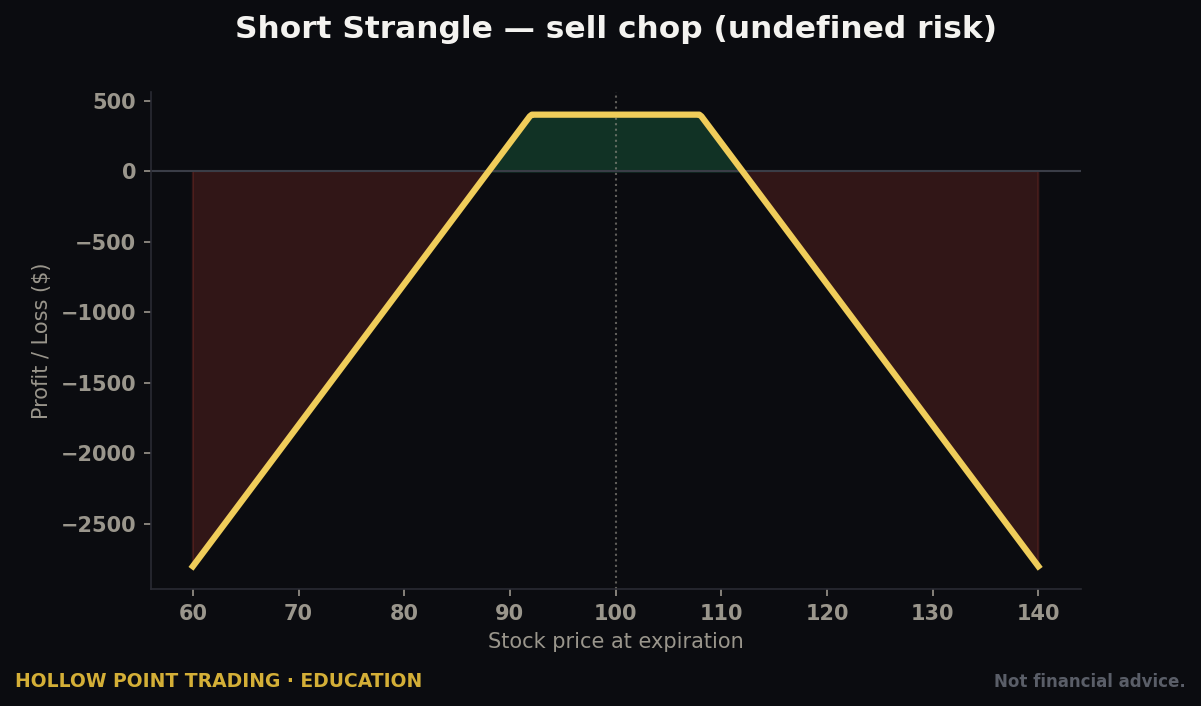
- Undefined-risk trades (naked puts, naked calls, strangles) can lose far more than the premium collected. tastytrade shows the buying-power reduction as a margin calculation, not a fixed max loss, and it's much larger and it moves as the underlying moves. These require higher approval and real capital discipline. HPT's rule applies hard here: if you can't state your max loss in dollars before you send it, you're not managing risk — you're gambling.
A full worked ticket: the put credit spread
Let's build one end to end. Underlying trades at $100. You're mildly bullish and want to sell a put spread 45 days out.
- On the chain, you find the 95 put trading around $1.60 and the 90 put around $0.60.
- Click the 95 put's bid to sell it, click the 90 put's ask to buy it. The ticket assembles a short 95 / long 90 put vertical, $5 wide.
- Net credit shows $1.00 ($100 per spread). Max profit $100, max loss $400 (the $5 width minus the $1 credit, times 100). Break-even $94 (short strike minus credit). POP reads around 68%.
- BPR shows roughly $400 — the max loss, since it's defined-risk.
- You send it as a limit at $1.00 credit, GTC. It fills.
- Immediately set a closing order: buy the spread back at $0.50 (50% of max profit) GTC. Because closes are free, this costs nothing and locks your discipline in.
Now theta and probability go to work. If the underlying drifts sideways or up, the spread decays and you buy it back at $0.50 for a $50 win, weeks before expiration. That's the whole loop.
The tastytrade ethos, and one HPT endorses: prefer defined-risk while you're learning. The tools make undefined-risk possible; they don't make it wise for a new account.
The Curve & Analysis Tools
This is what separates tastytrade from a plain order-entry broker, and it's why premium-sellers love it.
Curve view (on the Trade tab)
As covered above — your position drawn as a live payoff line. You see your break-evens and max-profit zone before committing. For a strategy like an iron condor, the curve instantly shows the "tent" of profit between your short strikes. Watching the curve reshape as you drag strikes wider or narrower builds an intuition that no amount of reading a payoff table ever will: wider strikes flatten and lower the tent (less credit, higher POP); narrower strikes raise and sharpen it (more credit, lower POP). The trade-off between credit and probability becomes something you can literally see.
The Analysis tab (desktop)
This is a full pre-trade lab. Load a prospective (or existing) position and you can:
- Model P/L across price — drag the price slider and watch profit change at expiration and at today's date.
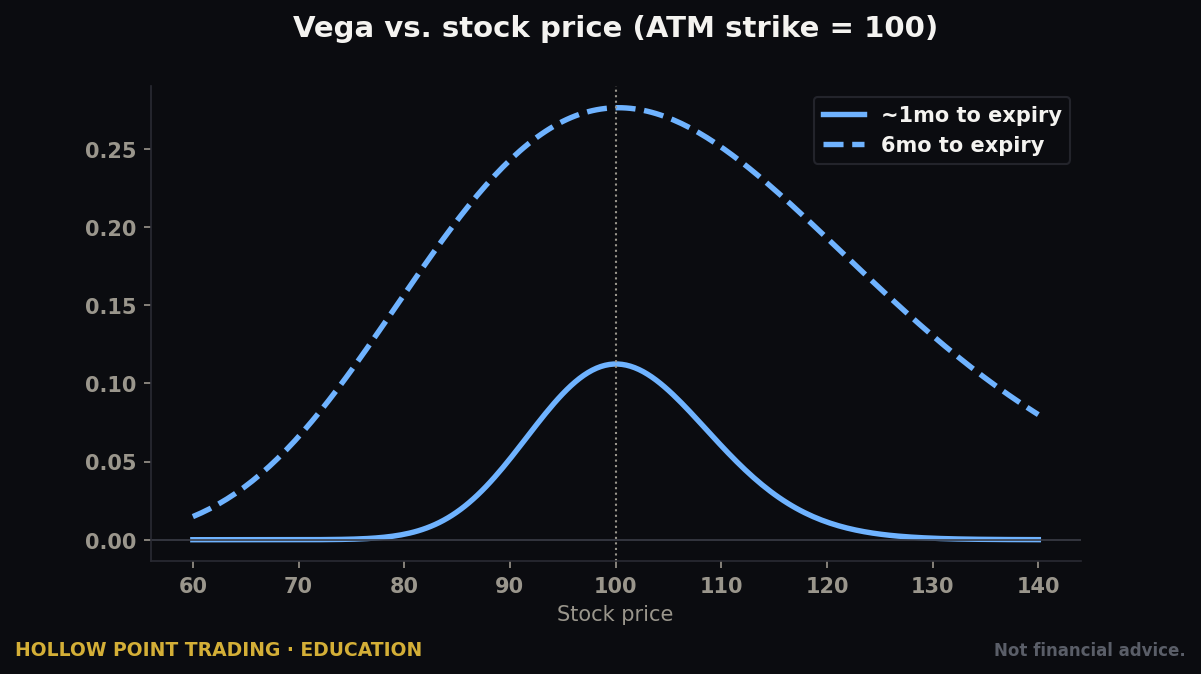
- Simulate volatility shifts — this is the killer feature for premium-sellers. Ask "what happens to this trade if IV drops 5 points?" Since sellers profit when volatility contracts, seeing the vega effect before you trade is huge. It's also how you find out that a trade you thought was directional is actually mostly a volatility bet.
- Test time decay — step the date forward and watch theta accumulate. You can see exactly how much you'd make if price does nothing for two weeks.
- Read the greeks in aggregate — net delta, theta, vega for the whole position, so you know your directional, decay, and volatility exposure as single numbers.
A worked Analysis-tab example
You've built that 95/90 put spread for $1.00. Before sending, drop it into Analysis and ask three questions. One: if the underlying falls 3% tomorrow, what's the mark? The slider shows it moving to roughly a $1.80 debit to close — an unrealized loss of about $80, well inside your $400 max, and probably a "hold and let it work" situation rather than a panic. Two: if IV spikes 5 points on that drop, vega adds to the loss — the tool shows you the combined price-and-vol hit, which is always worse than price alone. Three: if price does nothing for 21 days, theta alone carries the spread down to about a $0.45 mark — your winner. Now you've pre-lived the trade's three most likely near-term paths before risking a dollar. That is the difference between a plan and a hope.
Beta weighting
You can beta-weight your entire portfolio to a benchmark like SPY, which translates every position's directional risk into "SPY-equivalent deltas." In plain English: it tells you how long or short your whole account really is in terms of one index, so you can hedge intelligently instead of guessing. This is a professional risk-management tool that tastytrade puts in a retail account.
Here's why it matters concretely. You might have eight open positions across eight tickers and feel balanced. Beta-weight to SPY and discover your net position is +150 SPY deltas — you're effectively long a share and a half of the index, because most of your bullish put spreads are correlated and they all lean the same way. Now a single down day hurts everything at once. The fix might be one small bearish position in a high-beta name, or a call spread on SPY itself, to pull that number back toward neutral. Without beta weighting you'd never have seen the concentration; with it, your "diversified" book reveals itself as one big directional bet, and you can correct it.
The volatility curve / term structure
The platform can show IV by strike and expiration, letting you spot which expirations or strikes are richly priced — i.e., where the premium is fattest to sell. A steep term structure (near-dated IV far above far-dated) often means an event is priced in; a strike with a bulging IV relative to its neighbors (the "smile" or "skew") tells you where the market is most afraid, which is often where the richest premium — and the fairest-priced risk — sits.
Fees, Commissions & the PFOF Reality
tastytrade's pricing is one of its biggest draws, and it's genuinely competitive. Always confirm current numbers on their commissions-and-fees page, but as of this writing:
- Stocks & ETFs: $0 commission to open or close.
- Options on stocks & ETFs: $1.00 per contract to open, capped at $10 per leg, and $0 to close. Read that twice. You pay to open, never to close, and the open cost is capped. That means a big iron condor (four legs) costs a maximum of ~$10 to open no matter how many contracts, and nothing to close. For high-volume premium-sellers this is enormous — closing trades is free, which encourages disciplined profit-taking instead of holding to expiration to "save on commission."
- Options on futures: roughly $1.25 per contract each way (to open and to close).
- Futures: per-contract rates vary by product; verify.
- Pass-through fees: on top of commissions you pay small exchange and regulatory fees (roughly $0.05–$0.10 per options contract, and tiny regulatory fees on stock sales). These aren't tastytrade's markup — every broker passes them through, and they show on your confirmation.
- No account minimums, no maintenance fees, no inactivity fees, free ACH.
The commission cap changes behavior — on purpose
Because closing is free and opening is capped, the platform economically nudges you toward managing winners early. This isn't incidental. tastytrade's own research is built around the finding that closing short-premium trades at ~50% of max profit beats holding to expiration on a risk-adjusted basis — you free up capital and dodge the gamma risk of the final week. The fee structure and the trade philosophy are deliberately aligned: the platform makes the disciplined behavior the free behavior. Contrast a broker that charges per contract both ways — there, holding to expiration to avoid a closing commission is a real temptation, and it's exactly the wrong incentive.
A commission math example
You sell ten contracts of a one-lot put spread — that's ten short legs and ten long legs, twenty legs total. To open: the per-leg cap is $10, so you pay about $10 for the ten short legs and $10 for the ten long legs — roughly $20 to open, plus a few dollars of pass-through fees. To close: $0 in commission, just the tiny pass-through. Compare that to a broker charging $0.65/contract each way with no cap: opening twenty legs would run about $13, and closing another ~$13 — and you'd feel the pull to hold to expiration to avoid the second charge. The cap plus free closes is worth real money to anyone trading size and managing actively.
The payment-for-order-flow reality — the honest part
Like most zero-commission US retail brokers, tastytrade routes customer orders to wholesale market makers and, as part of that, participates in payment for order flow (PFOF) — the practice where the broker receives a small rebate for directing your order to a particular market maker. This is legal, disclosed, and how "commission-free" stock trading and cheap options get funded. tastytrade discloses its routing in its SEC Rule 606 reports (public, quarterly — you can read them).
What this means for you: on very tight, liquid names the execution impact is negligible; on wide, illiquid options always use limit orders so you set the price rather than accepting whatever the market maker offers. That single habit neutralizes most of the concern. A market order on a thinly traded option is an open invitation to be filled at the edge of a wide spread; a limit order at the mid-price says "meet me here or don't." Don't take my word for the current arrangement — read tastytrade's latest 606 disclosure yourself; routing relationships change, and the informed trader checks rather than assumes.
Margin, Account Types & PDT on This Platform
Account types
tastytrade offers Individual, Joint, IRA (Traditional, Roth, SEP, and — notably — IRAs that permit defined-risk options and even futures with the right approval), and Entity accounts (LLC, S-Corp, C-Corp, Partnership, Trust). International accounts are available in many countries. Each individual/joint/entity account can be cash or margin.
The IRA point deserves emphasis: being able to run defined-risk spreads and cash-secured puts inside a Roth IRA means the premium you harvest can compound tax-free. Many premium-sellers run their most mechanical, rules-based strategies inside a retirement account precisely because the tax drag on a high-turnover strategy in a taxable account is brutal, and short-term options gains are taxed as ordinary income.
Cash vs. margin
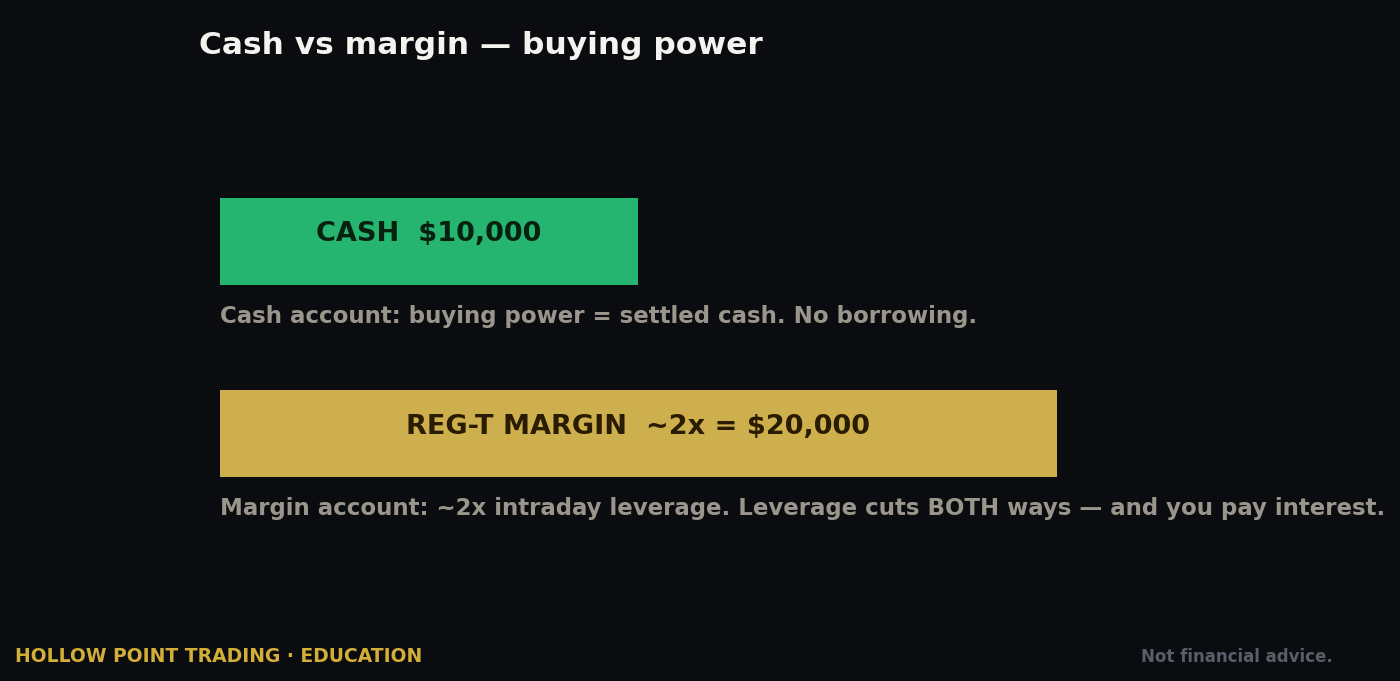
- Cash account — you trade with settled cash only; no borrowing. You can still sell cash-secured puts and covered calls and buy options. No $2,000 requirement, no PDT concerns historically. Simpler and safer for beginners, but capital-inefficient for spreads: a cash-secured put ties up the full strike value in cash, where the same risk in a margin account as a defined-risk spread ties up only the width.
- Margin account — requires maintaining $2,000+ in equity to use margin privileges. Unlocks defined-risk spreads with efficient buying-power usage, naked puts (with approval), and better capital efficiency. This is where most active tastytrade traders operate.
Portfolio margin
For large, sophisticated The Works accounts that meet the funding threshold, portfolio margin can dramatically increase buying power (tastytrade cites up to ~6.7x for qualified accounts) by margining your book on total risk rather than position-by-position. It nets offsetting risks across your whole portfolio instead of charging you for each position in isolation. Powerful and dangerous; the same leverage that lets a hedged book breathe will bury an over-leveraged one in a single bad session. Not a beginner feature, and honestly not an intermediate one either.
PDT — the big 2026 change
For two decades, the Pattern Day Trader rule forced anyone making four-plus day-trades in five business days in a margin account to keep $25,000 in equity. That rule was eliminated effective June 4, 2026, and tastytrade implemented the new framework on day one. In its place is an exposure-based intraday margin system (under the updated FINRA Rule 4210 framework): instead of a flat $25K wall, you must maintain equity proportional to your actual intraday risk, with dynamic buying power. Accounts that repeatedly fail intraday margin requirements within five business days can face a restriction period.
Net effect: small accounts can now day-trade options without the old $25K minimum — a genuine door-opener that reshapes what a $3,000–$10,000 account can do. But read the fine print carefully: the new system doesn't remove risk controls, it reshapes them around your exposure. Take too much intraday risk relative to your equity and the system throttles your buying power or restricts you. Because this is new and still settling, verify the current intraday margin rules on tastytrade's site before you day-trade a small account — this is the single most likely thing in this guide to have shifted since it was written.
Managing the Trade: Rolling, Adjusting & Taking Profits
Opening a trade is the easy half. tastytrade's real edge shows up in how fast it lets you manage one, and management is where premium-sellers actually make or lose money.
The right-click roll
On the Positions tab, right-click a short-premium position and you'll find Roll — it builds the order to close your current expiration and open the same (or adjusted) structure in a later cycle, as a single net order. You'll usually roll for a credit, extending duration to give a challenged trade more time and collecting more premium to improve your break-even. The platform defaults the roll to the next weekly or monthly cycle; you can change the target.
When to roll — and when not to
The discipline that separates winners from bag-holders: roll for a credit, or don't roll at all. If extending the trade in time lets you collect additional premium while keeping defined risk, rolling can be a legitimate way to give a trade room and repair your cost basis. If you can only roll for a debit — paying to extend a loser — you're throwing good money after bad and just deferring the loss. In that case, take the defined loss and redeploy the capital into a fresh, clean trade. A worked case: your 95/90 put spread is challenged with a week left, the short strike is near the money, and you can roll it out 30 days and down to 92/87 for a $0.30 credit. That's a legitimate roll — more time, better strikes, more premium. If the only roll available is a debit, close it.
Taking profits mechanically
Set the closing order the moment you open, at ~50% of max profit, GTC. Because closes are free, there's zero friction. This removes the single hardest decision in trading — when to book a winner — by making it automatic. Greed asks you to hold for the last $50; the data says the last $50 carries disproportionate gamma risk in the final weeks and isn't worth it. Let the GTC order do its job.
How the Cockpit Behaves in Different Market Regimes
The exact same trade behaves very differently depending on the volatility environment, and the platform's tools are there to tell you which environment you're in. Reading the regime first is what separates a repeatable process from a coin flip.
Low-volatility trend (grind-up)
IV is compressed, premiums are thin, and the underlying grinds higher on low volatility. This is the hardest environment for a premium-seller because you're being paid little to take risk. On the chain you'll see low IV and skinny credits; the Analysis tab will show modest theta. Pros respond by selling less, going smaller, and leaning slightly directional (put spreads under a rising market) rather than forcing neutral iron condors that pay nothing. The mistake here is over-trading to manufacture premium that isn't there. When the credit for a reasonable-probability spread is trivially small, the correct trade is often no trade.
High-volatility spike (fear)
IV explodes, premiums fatten, probability-of-touch numbers balloon. This is the premium-seller's harvest season and their graveyard. The credits are rich because the risk is real. tastytrade's IV rank/percentile readings help you see that current IV is historically elevated — the classic signal to sell volatility, because it tends to revert. The Analysis tab's vega simulation is critical here: a mean-reversion in IV can hand you a fast winner even if price doesn't move your way, and modeling that vega tailwind before you enter turns a scary environment into an edge. Size down, widen your strikes, and let the volatility contraction do the work.
Chop / range-bound
Price oscillates in a range, IV is middling. This is the iron condor's home turf — sell premium on both sides of the range, collect from both, and let time decay. The curve view's tent sits right over the range. The risk is a false breakout that runs to one of your short strikes; manage the tested side by rolling the untested side toward the money for extra credit (a standard condor adjustment the right-click tools make quick). Define your range off actual structure, not hope.
The IV rank habit
Before every premium-selling trade, glance at IV rank or IV percentile — where current implied volatility sits relative to the past year. High IV rank (say, above 50) means premium is rich relative to its own history and volatility is more likely to contract in your favor; low IV rank means you're being underpaid to sell. This one number reframes the entire trade. Selling a condor at IV rank 15 and selling one at IV rank 70 are completely different bets wearing the same costume.
Multi-Timeframe & Confluence: Fitting tastytrade Into a Real Process
The platform hands you a clean ticket, but a clean ticket around a bad idea is still a bad trade. Here's how the cockpit slots into a real analytical process rather than replacing it.
Duration is your timeframe dial
In options, "timeframe" largely means days to expiration (DTE). tastytrade research centers on the ~45-DTE entry for defined-risk premium as the sweet spot where theta acceleration and probability balance. Shorter durations (0–7 DTE) decay faster but carry violent gamma — small price moves cause large P/L swings near expiration. Longer durations (60–90 DTE) are slower and more forgiving but tie up capital longer. Think of DTE as your timeframe selector: scalpers live in 0–1 DTE, mechanical sellers live around 45 DTE, and position sellers stretch to 90. Match the duration to how much you want gamma — the sensitivity of your P/L to price — in your life.
Confluence tool #1: the underlying's chart structure
Pick your short strike with reference to actual support/resistance, not just delta. If the 30-delta put sits at $95 but there's a well-defined support shelf at $96 and a prior swing low at $94, you've got structural confluence: your short strike is protected by a level buyers have defended, and your break-even sits below a second one. The chain gives you the probability; the chart tells you where that probability has structural backing. A 30-delta strike sitting just under a strong level is a better sale than a 30-delta strike hanging in open air.
Confluence tool #2: implied volatility rank + earnings calendar
Never sell defined-risk premium into an unknown event. Cross-check the earnings/catalyst calendar against your expiration. High IV rank because earnings are three days away is a trap — the premium is fat for a reason, and the post-earnings move can blow through your short strike while IV collapses. Either trade the post-earnings IV crush deliberately (sell the inflated premium the day before, close right after the report as IV collapses) or avoid the event entirely. The IV reading and the calendar together tell you whether rich premium is opportunity or landmine.
Confluence tool #3: beta-weighted portfolio delta
Before adding any new position, check what it does to your beta-weighted SPY delta. A new bullish put spread that pushes an already-long book to +200 deltas isn't diversification — it's doubling down. The best new trade is often the one that pulls your aggregate exposure back toward neutral, even if in isolation you'd prefer a different direction. Portfolio-level thinking, enabled by beta weighting, is what turns a pile of trades into a managed book.
When chart structure, IV rank, the event calendar, and portfolio delta all point the same way, you have real confluence. When they conflict — rich premium but earnings tomorrow, good structure but your book is already leaning that way — the honest read is to pass. No manufactured confluence.
Strengths & Weaknesses vs. Peers
Where tastytrade wins
- Best-in-class options ticket — probability, BPR, and P/L curve on one screen. Nobody in retail does the build-a-spread-by-clicking-strikes flow more fluidly.
- Commission structure — capped opens and free closes genuinely reward disciplined management, and the incentives point the right way.
- Quick roll & management tools — right-click to roll a position to the next cycle; managing a big short-premium book is faster here than anywhere.
- Analysis/curve tools — pre-trade volatility and time-decay modeling that used to be pro-desk only.
- Education — the tastytrade financial network is a firehose of options-mechanics content, most of it free, and it's genuinely aligned with the platform's philosophy.
- Futures + options-on-futures in the same account with the same clean ticket.
Where it lags
- Thin research — no deep equity research, screeners, or analyst reports like Fidelity/Schwab. You bring the thesis; they give the mechanics.
- No mutual funds, limited fractional shares — not a wealth-building autopilot.
- Learning curve — the platform assumes you understand options. A total beginner can feel dropped in the deep end.
- PFOF — present, like most peers; execution purists who want to avoid it entirely look at brokers like Fidelity (which doesn't take PFOF on equities) or direct-routing platforms.
- Interface density — the desktop app is powerful but busy; the web app is friendlier.
Head to head
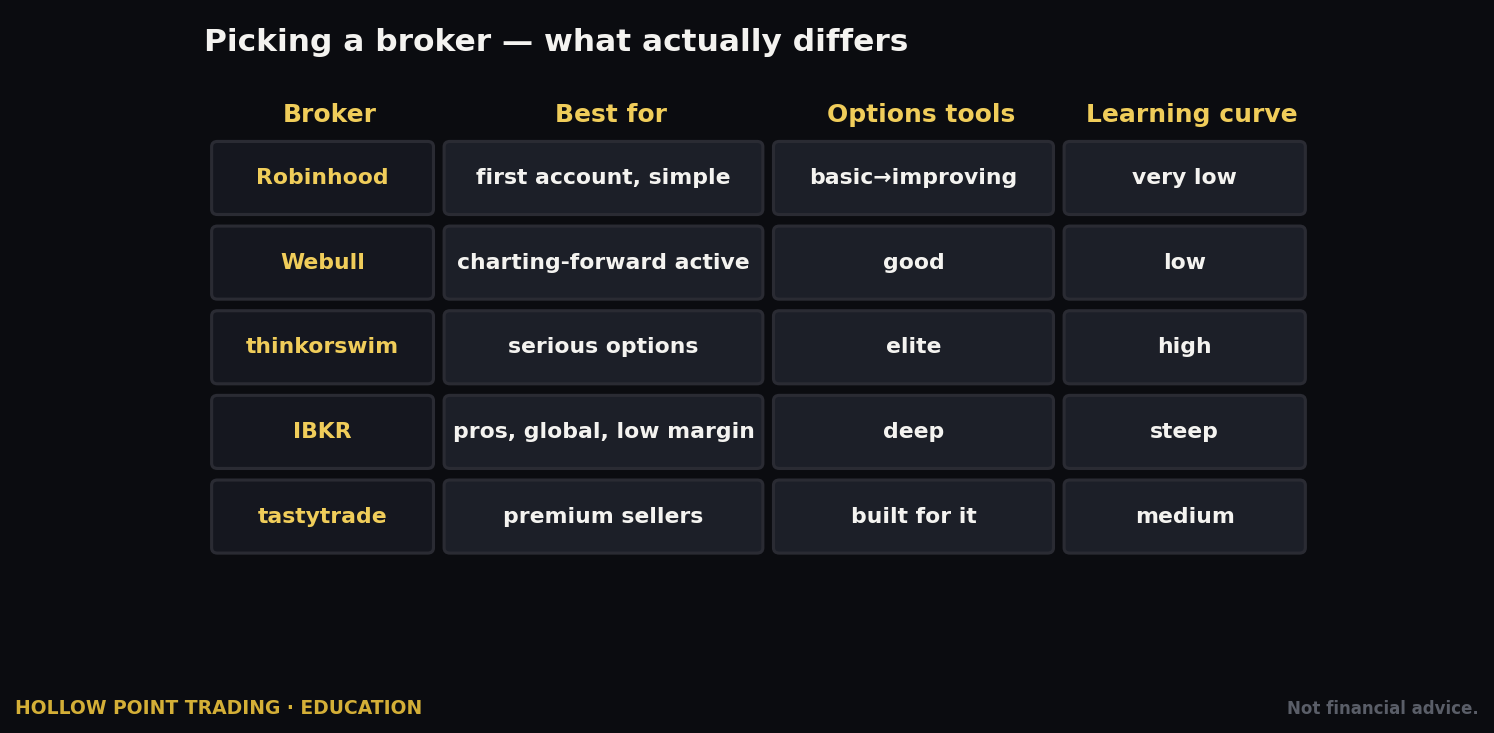
Versus thinkorswim (Schwab): TOS is the closest cousin (same DNA) and arguably has deeper charting and analytics, but tastytrade's ticket and commission caps are leaner for high-frequency premium-selling, and its management flow is faster. Versus Robinhood/Webull: tastytrade is a serious tool for serious options traders; the others are simpler and prettier but shallow on risk analysis — they'll let you sell a spread but they won't teach you to manage a book. Versus Interactive Brokers: IBKR has superior routing, lower margin rates, and global reach but a famously clunky options experience; tastytrade is far more pleasant for the premium-selling workflow specifically. The honest summary: if premium-selling is your game, tastytrade's ergonomics beat all of them; if you need research, global markets, or the absolute best execution, look elsewhere and accept a worse ticket.
How the Pros Use It Differently From Beginners
Same platform, same buttons, opposite behavior. The gap between a beginner and a professional on tastytrade isn't the tools they have access to — it's which numbers they look at and which reflexes they've trained.
- Beginners look at the credit; pros look at the buying-power reduction. The novice sees "$100 collected!" The pro sees "$400 of my capital is now at risk and tied up" and sizes the trade to that number, keeping any single position to a small percentage of the account.
- Beginners chase high premium; pros check IV rank first. Fat premium is fat for a reason — usually risk or an event. The pro asks why the premium is rich before selling it, and often the answer is "don't."
- Beginners hold winners hoping for more; pros close at 50% mechanically. The GTC closing order goes on at entry, and it doesn't get second-guessed. Booking the winner and redeploying beats squeezing the last dollar.
- Beginners panic when price touches the short strike; pros expect it. Probability of touch is roughly double probability of ITM. Getting tested is the normal path, not the alarm. Pros manage on rules; beginners manage on adrenaline.
- Beginners trade one position in isolation; pros manage a beta-weighted book. The pro knows their aggregate SPY delta at all times and adds trades to balance it, not to pile on.
- Beginners avoid losses emotionally; pros take defined losses cleanly and roll only for credits. A loss taken at plan and redeployed is a healthy part of a winning process. A loss nursed with debit rolls is how accounts die slowly.
- Beginners trade every day because they can; pros trade when IV rank, structure, and their book all line up. Occupancy of the market is not the goal. Edge is.
- Beginners use market orders to "just get filled"; pros work limit orders at the mid and let the fill come to them. On options, the fill price is part of the edge.
The uncomfortable truth: the platform will happily let a beginner do all the beginner things. The discipline has to come from you. The cockpit organizes the right numbers; it doesn't force you to trade by them.
Common Beginner Mistakes on THIS Platform
- Using market orders on options. The click-the-ask reflex is fine for liquid stock; on options with wide spreads it hands the market maker your wallet. Default to limit orders, always, and work them toward the mid.
- Ignoring the buying-power reduction number. tastytrade shows BPR for a reason. Beginners fixate on the premium collected and don't notice a single trade is tying up 30% of their account. Size to BPR, not to premium — keep any one position to a small slice of your capital.
- Trading undefined-risk before you're ready. The Works approval lets you sell naked calls. That doesn't mean a $3,000 account should. Stay defined-risk (Basic level) until you've managed 50+ trades through winners and losers alike.
- Overtrading because closing is free. Zero close commissions are great, but they can seduce you into churning. Free to close is a discipline aid, not an invitation to trade constantly. The absence of a fee is not a reason to trade.
- Skipping the Analysis tab. People build a position on the curve and fire without ever asking "what if IV rises 5 points against me?" The tool is right there. Use it before the trade, every time, until it's a reflex.
- Misreading probability of profit as certainty. A 70% POP trade still loses 30% of the time. The number is an edge, realized over many trades — not a guarantee on this one. Expect the 30% to show up, sometimes in clusters.
- Fat-fingering the wrong expiration or a naked leg. On a fast multi-click ticket it's easy to select the wrong month or accidentally leave a leg uncovered, turning a defined-risk spread into a naked position. Read the confirmation screen every single time — check the expiration, the strikes, and that every leg you intended is there.
- Treating the desktop app like a beginner tutorial. It isn't one. Start on web, watch the platform walkthroughs, then graduate to desktop once the rhythm is second nature.
- Selling premium into earnings without knowing it. The richest-looking premium on the chain is often three days before a report. Cross-check the calendar; don't get IV-crushed on the wrong side, or gapped through your short strike.
- Rolling losers for a debit. Paying to extend a losing trade feels like "giving it room" and is actually just deferring and often enlarging the loss. Roll for a credit or take the loss — there is no third option that ends well.
- Confusing probability of touch with probability of profit and bailing on good trades the moment price tags the short strike — the very touch the math told you to expect. Getting tested is not the same as losing.
- Ignoring IV rank entirely and selling premium in a low-volatility environment where you're barely paid to take risk. If the credit is trivial for the risk, the trade is trivial — pass and wait for volatility to pay you properly.
Frequently Asked Questions
Do I need $25,000 to day-trade options here? No — not since the Pattern Day Trader rule was eliminated on June 4, 2026. tastytrade now uses an exposure-based intraday margin system where required equity scales with your actual intraday risk rather than a flat $25K wall. Small accounts can day-trade, within the new risk limits. Verify the current intraday rules on their site, because this framework is new and still settling.
Can I trade options in an IRA on tastytrade? Yes. IRAs support covered calls, cash-secured puts, and defined-risk spreads with the right approval, and some IRA structures allow futures. Running mechanical premium-selling inside a Roth IRA lets the gains compound tax-free, which is why many sellers keep their most active strategies there.
Is the $10 commission cap per order or per leg? Per leg, per order, to open — and closing is free. A four-leg iron condor caps around $10 per leg to open regardless of contract count, and costs nothing in commission to close (just tiny pass-through exchange and regulatory fees).
Should I start on desktop or web? Web. It's less cluttered and harder to fat-finger while you're learning. Move to desktop once the click-price-review-send rhythm is automatic and you want the speed and right-click management. Manage existing positions from mobile when you're away from the desk.
What options approval level do I actually need? Basic (Level 2) for most premium-sellers — it unlocks defined-risk spreads and cash-secured/naked puts, which is where the vast majority of the strategy lives. The Works (Level 3) is only necessary for naked calls, futures, and options on futures. Don't chase a higher tier than your strategy requires.
Is payment for order flow going to cost me money? On tight, liquid names, negligibly. On wide, illiquid options it can matter — which is exactly why you use limit orders that set your own price rather than market orders that accept whatever's offered. Read tastytrade's quarterly SEC Rule 606 report to see current routing for yourself.
Why did my trade lose money even though the stock barely moved? Almost always volatility. If IV rose after you sold premium, vega worked against you even with price flat. Conversely, IV contraction can hand you a winner with no price move at all. This is why the Analysis tab's volatility simulation matters — model the vega before you trade.
When should I take profit? Mechanically, around 50% of max profit on short-premium defined-risk trades. Set the GTC closing order the moment you open — closes are free, so there's no reason not to. It removes the hardest decision in trading from your emotions.
What's the single best habit for a beginner here? Size every trade to its buying-power reduction, not to the premium collected, and read the confirmation screen every time. Those two habits prevent the two most account-ending mistakes: over-sizing and fat-fingering a naked leg.
Quick-Start Cheat-Sheet
Setup
- Open account (10–15 min) → answer the financial questionnaire honestly → it sets your options level.
- Fund via ACH (free, instant BP up to $10K). $0 to open; $2,000 equity needed to use margin.
- Target approval: Basic (Level 2) for defined-risk spreads and cash-secured puts.
Platform
- Web to learn → Desktop to trade → Mobile to manage.
- Trade tab = build & fire. Analysis tab = model risk first. Positions = watch BPR and P/L.
Reading the chain
- Delta ≈ probability ITM. 30-delta short ≈ 70% POP before management.
- Probability of touch ≈ 2× probability ITM. Expect to be tested; it's normal.
- Check IV rank first. High rank = premium rich, sell it. Low rank = underpaid, pass.
Placing a trade
- Click bid/ask → set quantity → Limit order at the mid → Day or GTC → read the confirmation → send.
- Multi-leg: click each strike; the ticket builds the spread automatically. Watch credit/debit, BPR, max loss, POP.
- ~45 DTE is the mechanical premium-selling sweet spot.
Order types: Market, Limit (your default), Stop, Stop-limit, Stops-on-spreads, OCO (bracket existing), OTOCO (bracket new). TIF: Day / GTC / GTD (futures = Day only).
Fees (verify current): Stocks/ETFs $0. Options on stock/ETF $1/contract to open, capped $10/leg, $0 to close. Futures options ~$1.25 each way. Plus pass-through exchange/reg fees.
Management
- Set the 50%-of-max-profit GTC close at the moment you open. Free closes reward it.
- Right-click a position → Roll to the next cycle — for a credit only. Debit roll = take the loss instead.
- Beta-weight your portfolio to SPY to see true directional exposure; add trades that neutralize it.
Regime read
- High-vol spike: sell rich premium, size down, let IV contraction pay you.
- Chop/range: iron condors over the range.
- Low-vol grind: sell less, lean directional, or don't trade — thin premium isn't worth forcing.
Rules of the road
- Defined-risk until you've earned the scars. State your max loss in dollars before every send.
- Size to buying-power reduction, not to premium collected.
- PDT $25K wall is gone (as of June 4, 2026) — replaced by exposure-based intraday margin. Small accounts can day-trade; verify the current intraday rules.
- Everything above: UI changes — confirm the live screen and the current fee page before you rely on it.
The through-line, and the reason HPT rates this platform for options traders: tastytrade doesn't just let you sell premium mechanically — it organizes the whole cockpit around doing it with discipline. Probability, defined risk, buying power, and a one-click roll are the four numbers a premium-seller lives by, and they're the four numbers this platform refuses to hide. Read the regime, stack your confluence, size to buying power, take winners early, and roll only for credits — and you'll be trading the way the people who built the tool intended. The cockpit is world-class. The pilot still has to fly it.
Sources: tastytrade commissions & fees · Trading Permissions · Account minimums · Bracket Orders · PDT rule elimination, effective June 4, 2026 · Analysis mode · StockBrokers.com tastytrade review
Bound by rules, feared by trade.